- Resources
- /
- Changelog
Hosted Agent Outbound IP Address Ranges Updating August 2, 2026
The outbound IP address ranges used by Hosted Agents are being updated. The updated ranges are now visible in your Cluster's Networking page, but will not take effect until August 2, 2026. The new, larger ranges provide additional IP address space to support increasing workloads.
If you maintain IP allowlists or firewall rules, please review and update them before August 2 to ensure uninterrupted access.
Have questions or need help? Reach out to us at support@buildkite.com
Kate
Diagnose infrastructure-related job failures through the REST API
Buildkite's REST API now exposes more of the job and runner context that agents, CLI tools, and MCP clients need to tell infrastructure failures apart from code failures.
The REST job object now includes signal and signal_reason. When signal_reason is present, it explains why the Buildkite Agent terminated the job, such as agent_stop or process_run_error. That gives automated debugging loops a clearer signal that the runner or process failed, rather than the code under test.
REST agent objects now include runner environment and lifecycle fields: os_id, arch, queue, connected_at, disconnected_at, lost_at, and stopped_at. These fields are also available through the agent embedded in a job response, so tools investigating a failed job can stay on the same API path and still answer questions like "did this runner disappear just before the job failed?"
Together, these additions make it easier for the Buildkite CLI, MCP clients, and other agentic CI workflows to diagnose failed jobs without falling back to the Buildkite UI. An agent can see whether a job was terminated by runner infrastructure, whether the runner was lost or stopped around the time of failure, and avoid blindly retrying builds that are unlikely to pass without infrastructure intervention.
These are additive read-only fields, with no migrations or GraphQL schema changes.
Sarah
Read-only API tokens no longer expose pipeline webhook URLs
Read-only API access tokens no longer return a pipeline's webhook_url in REST and GraphQL responses.
Previously, a read_only token created by someone with pipeline write access could still retrieve the webhook_url. Because that URL can be used to trigger builds, a token intended to be read-only could effectively grant write access.
Buildkite now checks both the token's scope and its creator's permissions, applying whichever is more restrictive.
This is a breaking change if you rely on reading a pipeline's webhook_url using a read-only token. Update that automation to use a token with pipeline write scope instead.
For more on token scopes, see the managing API tokens documentation.
Jonathan
Improvements to log groups for running builds
We've made a few improvements to the way log groups render on the new build page. For a running job, the log group that's currently running stays open and on screen, and we've added live durations and sticky headers to make it easier to follow along.
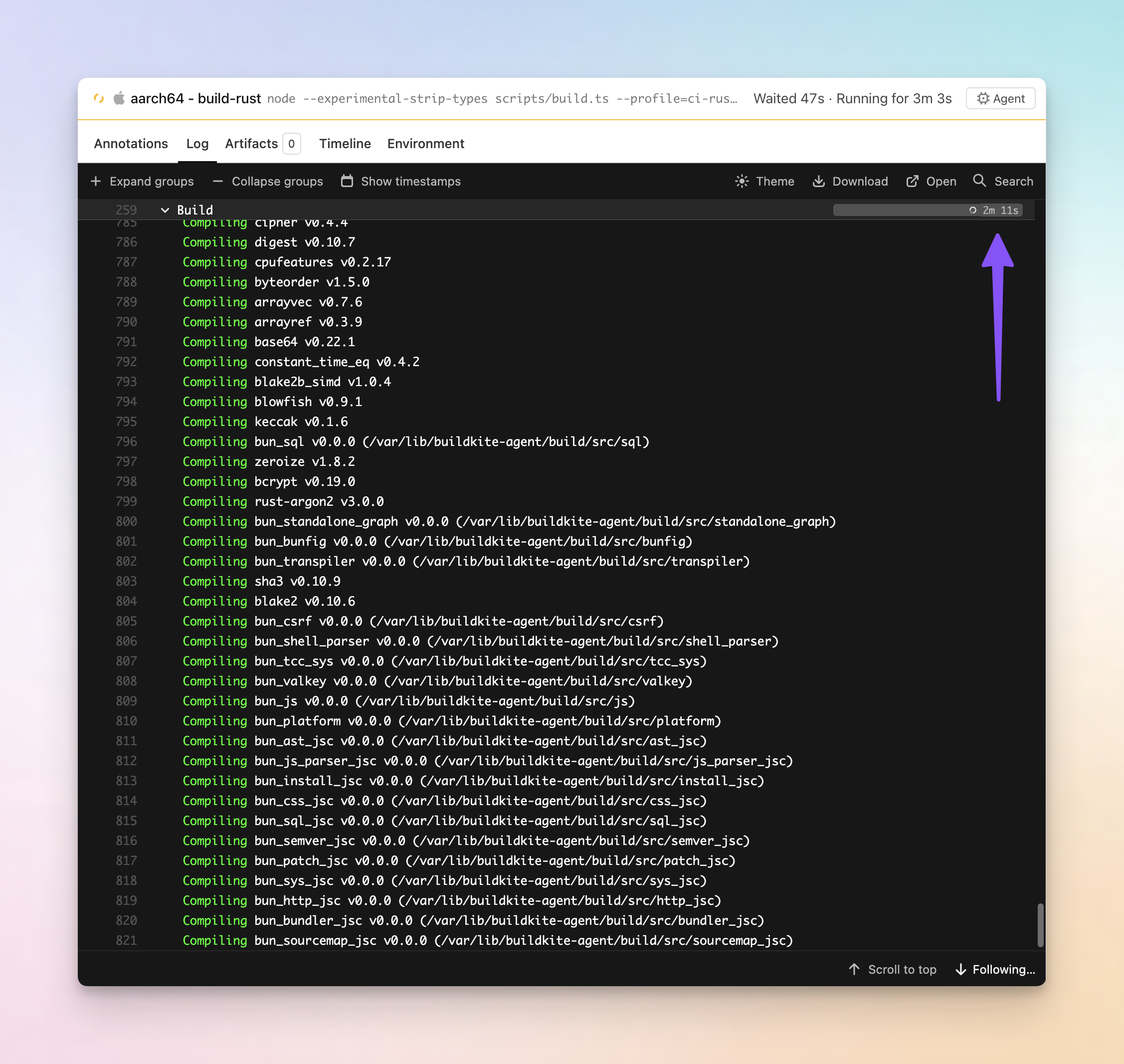
- See the duration of the running log group: The running log group now shows a ticking duration and a bar that grows in real time, instead of a spinner you stare at until the group finishes.
- Follow the output as it streams: The group that's currently running expands automatically so its output stays visible. When the job moves on, it folds back to how the step defined it and the next group opens.
- Never lose your place: Scroll deep into a long expanded group and its header sticks just below the toolbar, then hands off to the next group as you pass it.
We've also shipped some fixes along the way to log search highlighting, and the log scrollbar now matches your active theme.
These improvements are available on the new build page. Give it a try if you haven't by opting in on the build page and tell us what you think at support@buildkite.com.
Chris
Track the performance of your hosted agents
There's a new Metrics tab on every job that runs on Buildkite hosted agents, giving you a live view of how that job used its machine. No dashboards to wire up, no agent configuration — open a job and the charts are right there.
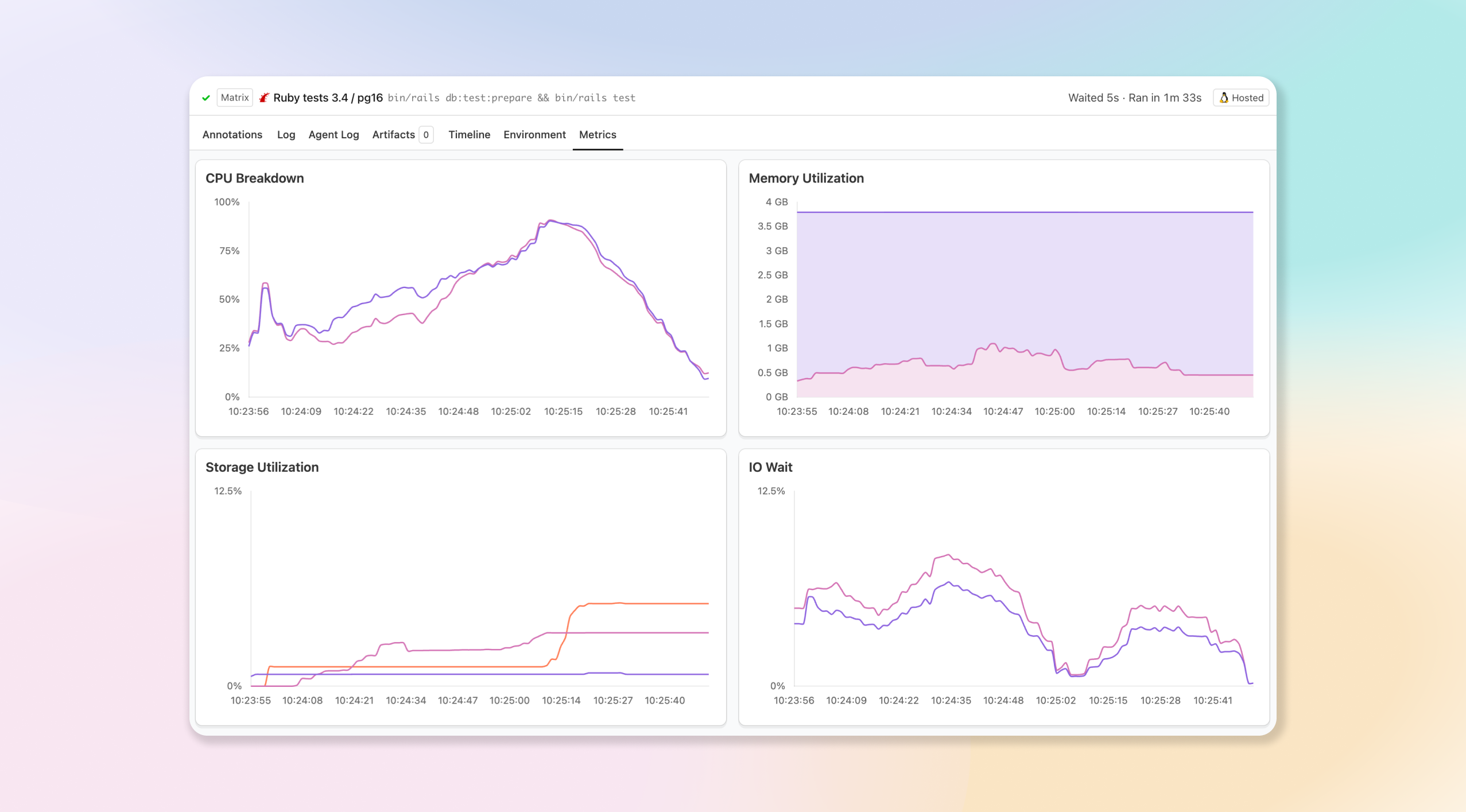
- Measure CPU load: See how hard the machine worked over the life of the job, so you can spot steps that are starved for CPU or right-size an oversized instance.
- Watch memory utilization: Track memory usage across the job to catch the spikes that lead to out-of-memory failures before they bite.
- Keep an eye on storage: Follow disk utilization over time to find jobs that are filling up the instance.
- Spot IO wait (Linux): On Linux instances, an extra chart surfaces time spent waiting on IO, making it easy to tell a disk-bound job apart from a CPU-bound one.
- Updates live as the job runs: The charts stream in while the job is still running and settle into a complete picture once it finishes, so you don't have to wait for the build to end to start investigating.
Use it to debug slow or failing jobs, right-size your hosted instances, and understand where your build minutes are actually going. Available now on jobs running on hosted agents — open any job and select the Metrics tab.
Gabe
REST API job endpoints for large builds
You can now fetch jobs separately from builds in the REST API, making large matrix or high-parallelism builds easier to query.
List builds without embedded jobs:
GET /v2/organizations/:org/pipelines/:pipeline/builds?exclude_jobs=trueThen fetch only the jobs you need:
# List jobs for one build, with filtering and pagination
GET /v2/organizations/:org/pipelines/:pipeline/builds/:build/jobs?state[]=failed&include_retried_jobs=false&per_page=100

# Fetch one job from a build
GET /v2/organizations/:org/pipelines/:pipeline/builds/:build/jobs/:uuid

# Fetch one job directly by UUID
GET /v2/organizations/:org/jobs/:uuid
Use exclude_jobs=true by default when listing builds unless you need embedded jobs, then use the jobs endpoints for targeted access.
See the REST API jobs documentation for endpoint details and examples.
Buildkite
Buildkite Agent improvements
Checkout
- Skip checkout on any agent by setting
BUILDKITE_SKIP_CHECKOUT=true— no plugin or workaround required. Previously this meant clearingBUILDKITE_REPO, using a checkout plugin, or (in the Agent Stack for Kubernetes) settingcheckout: skip: true. - Skip fetching commits you already have with
--git-skip-fetch-existing-commits, which skips thegit fetchstep during checkout when the target commit already exists locally. This saves time and network I/O on every build where the commit is already available, which is especially useful for agents using git mirrors. - Bound how long a checkout attempt can run with
--git-checkout-timeout(orBUILDKITE_GIT_CHECKOUT_TIMEOUT), specified in seconds. A hung git operation (clone, fetch, checkout, or submodule update) would previously wedge a job indefinitely; now an attempt that exceeds the timeout is cancelled and handed to the agent's existing checkout retry loop instead of blocking forever. The default is0, which keeps the current behavior of waiting indefinitely. - Control submodule cloning per pipeline or step by setting
BUILDKITE_GIT_SUBMODULESat the pipeline or step level (or via a hook), without needing to reconfigure your agents.
Artifacts
- Faster downloads from your own S3 buckets. The agent splits each download into parallel ranged requests (a multipart download) instead of fetching the object as a single stream, which significantly speeds up downloads of large artifacts. This is enabled by default; you can opt out with
--no-s3-multipart-download(orBUILDKITE_NO_S3_MULTIPART_DOWNLOAD). - Tunable upload concurrency. Uploads have always run in parallel, but the number of concurrent uploads was fixed to the agent's CPU count, which can be a bottleneck for jobs that upload many small files, where wall time is dominated by per-request latency rather than CPU work. The default is unchanged, so existing agents behave exactly as before, but you can now raise (or lower) the limit with
--concurrencyonbuildkite-agent artifact upload, theBUILDKITE_ARTIFACT_UPLOAD_CONCURRENCYenvironment variable, or fleet-wide viaagent start --artifact-upload-concurrency.
More agent improvements
- More control over
if_changedduringpipeline upload. The--fetch-diff-baseflag (orBUILDKITE_FETCH_DIFF_BASE) ensures the agent fetches the configured diff base before computing the file diff, so the local repository has an up-to-date copy of the base branch. The--changed-files-pathflag (orBUILDKITE_CHANGED_FILES_PATH) lets you supply a pre-computed list of changed files instead of relying on git commands to detect changes. - Hooks can detect job timeouts. The agent sets
BUILDKITE_JOB_TIMED_OUT=truein the post-command hook environment when a job hits its timeout, so your hooks can distinguish a timeout from other cancellation reasons and react accordingly (for example, to send a specific notification or clean up differently). - Fail fast on missing cloud tags with
--fail-on-missing-tags(orBUILDKITE_AGENT_FAIL_ON_MISSING_TAGS), which exits the agent on startup if an enabled cloud tag source (EC2, ECS, or GCP) fails to return tags. Without this, an agent that fails to read its instance tags — for example due to cloud API rate limiting — would still connect to Buildkite but be misrouted or unusable for builds that rely on tag-based targeting. Failing fast makes the problem obvious and easy to diagnose.
These improvements rolled out across several agent releases. Update to Buildkite Agent v3.127.2 or later to take advantage of all of them. See the agent release notes for the complete list of changes.
Buildkite
Remote MCP Server API access token support is now available (Preview)
A preview of Buildkite API access token authentication for the Buildkite Remote MCP Server is now available through a dedicated endpoint: https://mcp.buildkite.com/direct.
Use this endpoint for headless or background agents that already have a Buildkite API access token and do not need the interactive OAuth flow. This helps avoid contention around shared OAuth tokens when multiple background agents are running at once.
Pass the token using the standard Authorization: Bearer header. Buildkite enforces the token's scopes on each API request, so use a token with the minimum access your agent needs.
The existing OAuth endpoint at https://mcp.buildkite.com/mcp is unchanged and remains the default for interactive MCP clients. The /direct endpoint supports the same toolset and readonly routing options, including /direct/readonly and /direct/x/{toolset}/readonly.
This feature is currently in preview. If you run into issues or have feedback, please reach out to support@buildkite.com.
Mark
Buildkite MCP Server adds cluster, build, and schedule management tools
The Buildkite MCP Server can now do more than read from Buildkite. It can take action across clusters, builds, jobs, and pipeline schedules.
New cluster and queue management tools let agents list, inspect, create, and update Buildkite clusters and cluster queues, and pause or resume queue dispatch. These are gated behind the read_clusters and write_clusters toolsets.
Agents can now cancel a running build, rebuild a completed one, retry a specific failed job, and read a job's environment variables with get_job_env. These write operations are gated behind the write_builds toolset.
Pipeline schedule tools now support listing, inspecting, creating, and updating schedules, so agents can manage scheduled builds directly from your MCP client.
The new list_agents and get_agent tools show which Buildkite agents are connected and their current state.
The server also ships with built-in instructions for MCP clients, helping agents use the tools more reliably.
get_artifact now uses structured identifiers instead of a URL. It takes org_slug, pipeline_slug, build_number, job_id, and artifact_id, which map directly onto the output of list_artifacts_for_build and list_artifacts_for_job, so the tools chain together without needing to parse a URL.
These improvements apply to both the open-source MCP server and the Remote MCP server.
Mark
Buildkite GraphQL API updates
The metaData field on builds and jobs now supports up to 1 MB of total data, up from the previous 64 KB limit. If you've been hitting size constraints when attaching metadata to builds, this gives you significantly more room.
Job annotations are now accessible through the GraphQL API. You can query annotations for any job, including the body content, context label, and annotation style, without needing to use the REST API or parse build pages.
Buildkite
Dynamically update job timeouts with `buildkite-agent job update`
You can now update a job's timeout at runtime using the new buildkite-agent job update command. If a job discovers mid-run that it needs more (or less) time, it can adjust its own timeout without requiring a pipeline change.
$ buildkite-agent job update timeout 20This sets the job's timeout to 20 minutes. You can also pipe the value from stdin:
$ echo 20 | buildkite-agent job update timeoutThe command targets the current job by default (via $BUILDKITE_JOB_ID), or you can specify a job explicitly with --job <id>.
How it works
buildkite-agent job update follows the same pattern as the existing buildkite-agent step update command, but operates at the job level. The attribute and value are validated server-side, which means new attributes can be introduced in future without requiring an agent release.
Timeouts are enforced by the Buildkite server and may take up to 2 minutes to take effect after the command runs. Only command jobs can be updated, and only while they are still running.
This is useful when a job has information at runtime that wasn't available when the pipeline was defined — for example, detecting that a test suite is larger than expected and needs more time, or that it's smaller and should fail sooner to avoid tying up agent capacity unnecessarily.
For more information, see the Buildkite Agent CLI reference.
Matthew
New `tests` plugin for running your test suites
The new tests Buildkite plugin is the easiest way to run your test suites on Buildkite. Add the plugin to your step and set its command to bktec run, and bktec (Buildkite Test Engine client) splits your tests across parallel jobs out of the box. You also get test analytics, flaky test detection, timing, and history, with nothing extra to wire up.
steps:
  - label: "RSpec"
    command: bktec run
    parallelism: 4
    plugins:
      - tests#v1.0.0:
          test-runner: rspec
          result-path: tmp/rspec-result.json
The plugin works with every runner bktec supports, including RSpec, Jest, Cypress, Playwright, pytest, gotest, Cucumber, and NUnit.
Analytics out of the box
With bktec v2.7.0, the plugin uploads test results by default, so there is no separate test collector to install or configure. You get flaky test detection, per-test timing, and failure history from the first build. This can be disabled if you prefer to use a test collector instead.
Zero setup
The plugin handles everything behind the scenes:
- Downloads
bktecand makes it available to the step (can be disabled if you prefer to install it yourself) - Generates a short-lived OIDC token for authentication, so there are no API tokens to rotate
- Creates the test suite from the pipeline on the first run if it doesn't exist
- Exposes all
bktecoptions as plugin attributes, so you don't need to manage environment variables yourself
Get started
Add the plugin to any step that runs bktec run or bktec plan. See the plugin README for the full list of options.
Naufan
Upload test results directly with bktec and the Upload API
You can now upload test results directly to Test Engine, either through bktec v2.7.0's new upload option, or by pushing raw output yourself via the Upload API. Test collectors are still supported, but they're no longer a hard dependency.
bktec v2.7.0 - direct result uploads
bktec v2.7.0 adds a new BUILDKITE_TEST_ENGINE_UPLOAD_RESULTS option and --upload-results flag to upload your test runner's raw output straight to the Upload API. You can also tag uploads with key/value pairs to filter and group results in Test Engine.
See the bktec README for details.
Upload API - native output support
The Upload API now accepts native JSON output from RSpec, Cucumber, Jest, and Playwright directly, without any format conversion.
- RSpec (
rspec-json) - Cucumber (
cucumber-json) - Jest (
jest-json) - Playwright (
playwright-json)
Naufan
OIDC authentication in Test Engine
Test Engine now supports OIDC token authentication for test collectors and bktec.
An OIDC policy must be set on any suite using OIDC authentication, specifying which pipelines are permitted access to the suite.
Test Collectors
It's now possible for test collectors to use temporary OIDC tokens to authenticate test result uploads.
bktec
As of version 2.6.0, the Buildkite Test Engine Client (bktec) supports generating short lived OIDC tokens for authentication with Test Engine.
bktec has previously required two authentication environment variables to be set on builds, BUILDKITE_TEST_ENGINE_API_ACCESS_TOKEN and BUILDKITE_ANALYTICS_TOKEN.
Both of these are now optional.
bktec will generate an OIDC token if either is missing.
- If the previously mandatory environment variable
BUILDKITE_TEST_ENGINE_API_ACCESS_TOKENis not set ,bktecwill generate an OIDC token to communicate with the test splitting API. - If the environment variable
BUILDKITE_ANALYTICS_TOKENis not set,bktecwill generate an OIDC token and setBUILDKITE_ANALYTICS_TOKENwith it's value when invoking the test runner. Test collectors use this environment variable by default to authenticate test result uploads. - Token lifetime is 2 hours by default, and can be controlled with the
--oidc-lifetimeflag. - OIDC token generation can be disabled with the
--no-oidcflag.
Further reading
Malcolm
A simpler build page layout with a new list view
Finding the job you care about on a busy build just got faster. The build page has a cleaner layout, a proper list view in place of the old sidebar, and less duplicated information getting between you and what you're actually trying to inspect.
- Find the job faster: Jobs are scannable at a glance, with room to breathe. Long step names are finally readable instead of truncated into uselessness.
- A cleaner layout: Pipeline and jobs on the left, the detail you're inspecting on the right. Less hunting, more space for the thing you care about.
- Works on your phone: The list view is fully responsive, so checking in on a cheeky build while you're AFK is no longer a pinch-and-zoom ordeal.
- Filter jobs by state: Something the old sidebar couldn't do at all. Find that one scheduled step inside a running group without scrolling.
- Groups stay grouped: When you filter or group by state, parallel, matrix and group steps keep their parent visible instead of flattening, so you never lose the context of where a job belongs.
- Less duplication: Repeated headers and metadata are gone, so the information you need stands out.
- Jump to anything, from anywhere: Search straight to a job or step from any view — including the canvas.
Available now for everyone on the new build page — turn it on from your user settings if you haven't already. Tell us what you think at support@buildkite.com.
Chris
OAuth Token Exchange: short-lived API tokens from your identity provider

Buildkite now supports OAuth 2.0 Token Exchange (RFC 8693), letting you mint short-lived Buildkite API tokens on behalf of your user directly from your identity provider (IdP). Instead of managing long-lived API tokens, your identity provider tooling can exchange a signed JWT for a scoped, time-limited Buildkite token — no secrets to store, rotate, or worry about leaking.
How it works

First, set things up once: generate a keypair in your infrastructure, keep the private key with your tooling for signing JWTs, and publish the public key on a JWKS (JSON Web Key Set) host. Then register a token exchange application in your Buildkite organization settings, point it at your JWKS (inline or via URI), and configure the grantable scopes, maximum TTL, and any IP restrictions for minted tokens.
From there, each token exchange follows three steps:
- Your tooling signs a JWT with its private key and sends it to Buildkite's
/oauth/tokenendpoint. - Buildkite fetches your JWKS to verify the JWT's signature against your published public key.
- Buildkite mints a short-lived
bktx_token scoped within the limits of your token exchange application and returns it to your tooling. Every mint is recorded in the audit log against the application, user, and key ID.
curl -X POST https://api.buildkite.com/v2/oauth/token \
  -d grant_type=urn:ietf:params:oauth:grant-type:token-exchange \
  -d client_assertion_type=urn:ietf:params:oauth:client-assertion-type:jwt-bearer \
  -d client_assertion=$SIGNED_JWT \
  -d audience=your-org-slug \
  -d subject_token=$USER_EMAIL \
  -d subject_token_type=urn<img class="emoji not-prose size-4 inline align-[-0.1em]" title="buildkite" alt=":buildkite:" src="https://buildkiteassets.com/emojis/img-buildkite-64/buildkite.png" draggable="false" />params:oauth:token-type:user-email \
  -d scope="read_builds read_pipelines"
Key details
- Short-lived by design: Tokens expire automatically based on the TTL you configure (or request per-exchange), so leaked credentials are already expired.
- Scoped access: Each token exchange application defines grantable and default scopes, and callers can request a subset per token.
- IP restrictions: Lock down token exchange requests and minted tokens to specific source IP ranges.
- Full audit trail: Every token minted is logged as an audit event, tied to the token exchange application, user, and public key ID.
- JWT private key rotation support through JWKS URI: Point to your IdP's hosted JWKS endpoint and Buildkite will fetch and cache public keys associated with your JWT private key automatically, including support for key rotation.
- Rate limited: Organization-level rate limiting protects against abuse.
OAuth Token Exchange is available on Enterprise plans. To get started, see the OAuth Token Exchange docs, visit your organization's settings, or reach out to your account team.
Sorcha
Official Buildkite skills for AI coding agents
Buildkite skills are now available for Claude Code, Cursor, and other AI coding agents. Skills are short, agent-readable guides that teach an agent how to use Buildkite: pipeline conventions, the shape of our APIs, and the patterns we recommend for things like dynamic pipelines, OIDC federation, and CI migrations.
Install them with one command:
npx skills add buildkite/skillsSkills sit alongside the docs rather than replacing them. Where docs explain what a Buildkite feature does, a skill teaches an agent how to use it well: recommended patterns, common mistakes, and the judgement calls an experienced user makes.
What's in the repo today
- buildkite-pipelines: designing a pipeline, tuning caching, debugging builds, generating dynamic steps, and running matrix builds
- buildkite-agent-runtime: annotating builds, uploading and fetching artifacts, passing data between steps, uploading dynamic steps from inside a job, and federating with cloud providers via OIDC
- buildkite-cli: triggering and inspecting builds from your terminal, managing pipelines and secrets locally, and scripting against Buildkite
- buildkite-api: automating Buildkite from your own systems, building integrations, querying build data at scale, and reacting to events with webhooks
- buildkite-migration: planning a move to Buildkite from GitHub Actions, Jenkins, CircleCI, Bitbucket Pipelines, or GitLab CI, and converting existing pipeline YAML
- buildkite-preflight: validating local pipeline changes against real CI before you push
Contributing
The repo welcomes contributions: patterns from your own pipelines, gotchas you've hit in production, and corrections to anything wrong or out of date. See github.com/buildkite/skills for installation instructions for individual agents and contribution guidelines.
Product
Per-user rate limits for the Buildkite API
The Buildkite REST and GraphQL APIs now rate limit on a per-user basis, so one runaway script can't chew through your organization's entire API quota.
There are two limits, applied together:
- Organization-wide limit: Caps total API usage across all human and machine users in your organization.
- Per-user limit: Caps API usage available to an individual user, with a separate limit for machine users.
If someone hits their per-user cap, only their requests are throttled - everyone else carries on as normal. Machine users can have a separate, higher limit to keep automations humming along.
For existing organizations, we've initially set the per-user limit to match the organization-wide limit, so no users will be limited beyond what your organization-wide limit is currently set to.
Per-user API limits are a powerful tool for reducing the risk of individual users consuming too much of your organization-wide limit and negatively impacting your regular CI/CD operations. When you're ready to improve your controls over user API usage, contact support to enable stricter per-user limits.
New organizations will have both limits set to reasonable levels by default.
Your existing API tokens and integrations will keep working without any changes.
For more details, see the REST API rate limits and GraphQL API rate limits documentation.
Jason
Trigger pipelines from more GitHub events
Buildkite pipelines can now be triggered by a much broader set of GitHub webhook events — not just pushes and pull requests. This makes it easier to migrate GitHub Actions workflows to Buildkite incrementally, without losing triggers along the way.
New event triggers
You can now trigger pipeline builds from:
- Pull request reviews — run builds when a review is submitted or dismissed
- Check runs — react to completed check runs from other GitHub Apps, with built-in loop prevention for Buildkite's own checks
- Releases — trigger builds when a GitHub release is published, created, or released
- Issue comments — kick off builds from PR comments, with configurable command word filtering (supports
exactandcontainsmatch modes) - Pull request review comments — trigger builds from inline diff comments, with the same command word and match mode support (useful for AI assistant triggers like
@claude) - Deployment statuses — build when a deployment status changes
- Branch and tag creation — trigger on
createevents for new branches or tags
Expanded pull request actions
Pull request triggers now support additional actions beyond opened and synchronize:
Builds can now be triggered by edited, reopened, converted_to_draft, review_requested, and dequeued actions, in addition to the existing ready_for_review, labeled, and unlabeled actions.
Disable all webhooks
You can now disable all GitHub webhook-triggered builds for a pipeline with a single button. Select Disable GitHub Webhooks in your pipeline's GitHub settings to stop all webhook processing. Your existing trigger settings are preserved and restored when you re-enable.
Better filtering
GitHub webhook-triggered builds also now include BUILDKITE_GITHUB_EVENT and BUILDKITE_GITHUB_ACTION environment variables, available at runtime and in build.env() conditionals. These are also included as new conditional variables to make it easy to write fine-grained build filters:
build.source_event— the GitHub event type (e.g.push,pull_request,release)build.source_action— the event action (e.g.labeled,opened,submitted)
We've also added build.pull_request.label, which allows for filtering on the specific label that was just added or removed, rather than the whole set of labels.
All the new events expose relevant context as environment variables via build.env() that you can use in pipeline and step conditionals. This allows for more fine-grained filtering before you start running builds and steps.
Learn more about configuring GitHub webhook triggers in our documentation.
Hannah
Search queues within a cluster
You can now search for queues by name on the cluster queues page, making it much faster to find a specific queue when your cluster contains hundreds of them.
- Find queues quickly: Type any part of a queue name to filter the list instantly, with case-insensitive substring matching so you don't need to remember the full name or exact prefix.
- Fast, in-page updates: Results update in place as you search, without full-page reloads, and pagination continues to work across filtered results.
- Scales to large clusters: Built for customers consolidating many queues into a single cluster as part of a cluster migration, where scanning a paginated list is no longer practical.
Chris
Start turning complexity into an advantage
Create an account to get started for free.